




Runs in your own AWS account·Bedrock-first

One governed front door to AI.

Agents, knowledge and apps for every team, on department budgets, with an audit row for every call.

01Signed in · Entra IDtran.mai@ecloudvalley.com
02Sales budget · 62% of $5,000$3,120 spent this month
03Model allowed for SalesClaude Sonnet 4.5 via LiteLLM
04Guardrail · 1 value maskedphone number → [PHONE]
05Audit row · 14:32:08 · $0.021user · dept · agent · model · cost
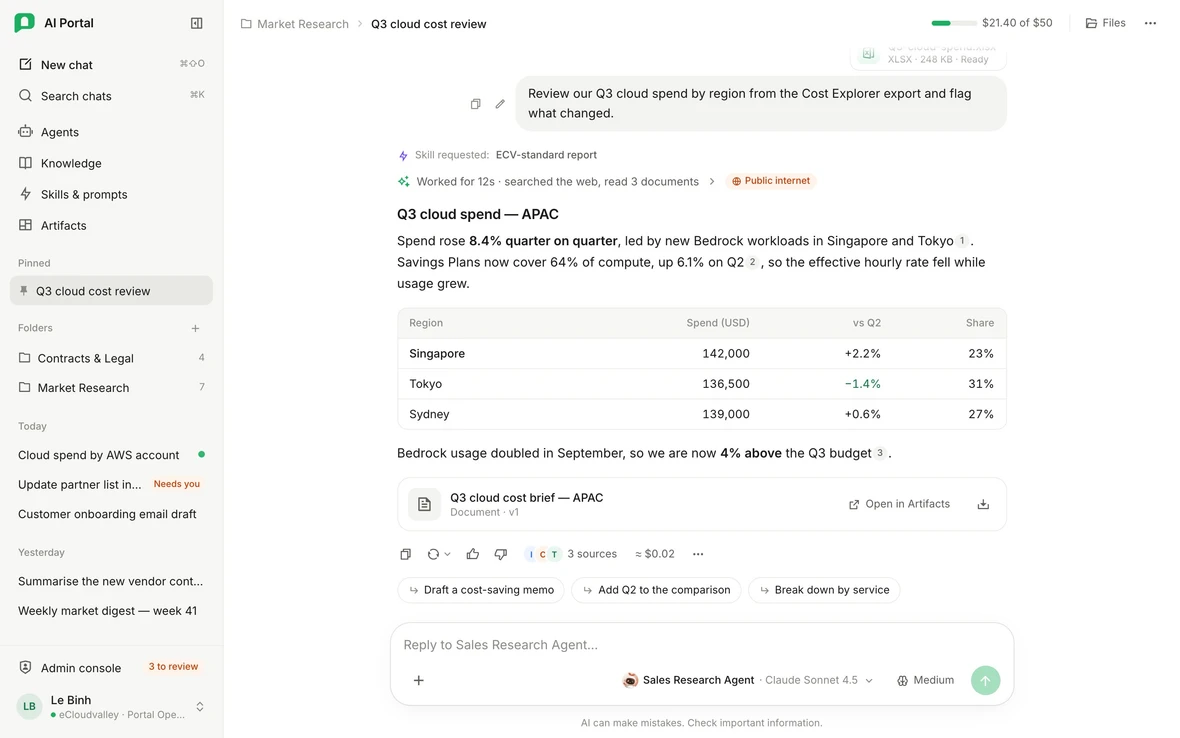
Summarise our Q3 pricing vs. two competitors5 checks passed

Our Standard tier is $4,200 a month, about 6% below the average of Fabrikam's and Litware's public list prices12. Premium sits level with both.

Sales Research Agent Claude Sonnet 4.5 Billed to Sales ≈ $0.02

Built on AWS and the identity stack you already run

  • Amazon Bedrockmodels
  • AgentCoreagent tools
  • LiteLLMmodel gateway
  • Microsoft Entra IDsign-in · SCIM
  • Oktasign-in · SCIM
  • Keycloakidentity broker
  • SharePointknowledge sync
  • pgvectorknowledge search
  • MCPconnected apps
The problem

AI adoption started without you.

Every department bought its own AI. Nobody knows where the data went, what it cost, or who still has access.

No governance

Data goes to whichever AI each employee signed up for.

No cost control

AI spend on a dozen credit cards. No owner.

No identity lifecycle

People who left still have the login.

No shared leverage

Your best prompts live in personal accounts.

How it works

One request, start to finish.

Runs survive a refresh
3 / 4 · Asks when it should
Capabilities

Everything your teams reach for, in one governed place.

Agents, knowledge, artifacts, memory and apps, behind one sign-in.

Agents

Instructions, skills, tools and knowledge. Configuration, never a new server.

Knowledge

Synced from SharePoint. Cited, and only what you may open.

Artifacts

Documents, decks, sheets and web apps. Every version kept.

Memory

Read, edit or delete it. Only you can see it.

Connected apps

One MCP gateway, permissions per app. Changes ask first.

Also included
  • Models on Amazon Bedrock
  • Shared skills & prompts
  • ⌘K search
  • Files and scans
  • Resumable runs
Department agents

Built for how your company works.

Agents for Sales, HR, Legal and Finance on one host. Configuration, not infrastructure.

Sales Research Agent
Shared with Sales

InstructionsResearch competitors, accounts and cloud market news. Cite the date of each price.

ToolsWeb research
KnowledgeMarket reports
ModelClaude Sonnet 4.5
People Policy Agent
Shared with everyone

InstructionsAnswer leave, benefits and onboarding questions from the HR handbook only.

ToolsKnowledge search
KnowledgeHR handbook
ModelClaude Haiku 4.5
Contract Reviewer
Shared with Legal, Sales

InstructionsCheck contracts against our standard terms. Flag risky clauses by number.

ToolsRead files
KnowledgeContract templates
ModelClaude Sonnet 4.5
Finance Analyst
Shared with Finance

InstructionsTurn cost exports into tables and charts by department and month.

ToolsCode Interpreter
KnowledgeFinance policies
ModelAmazon Nova Pro
One agent host
Loads each agent per message, in your AWS account.
Loaded for this message
Sales Research AgentWeb researchMarket reportsClaude Sonnet 4.5
People Policy AgentKnowledge searchHR handbookClaude Haiku 4.5
Contract ReviewerRead filesContract templatesClaude Sonnet 4.5
Finance AnalystCode InterpreterFinance policiesAmazon Nova Pro
4agents
1host
0new deploys
LiteLLM gateway Amazon Bedrock Billed to the asker's department

Built by admins or members

Self-service. Admins can switch member building off.

Shared by rules, not by owner

Allow by department, group or person. Deny wins.

Cost follows the person asking

Any agent bills the asker's own department.

Governance

Access you can explain.
Deny always wins.

Groups decide what people see. Departments decide who pays. One deny overrides every allow.

Roles answer what you can do.
Visibility answers which things.
Departments answer who pays.
1Access check

Check anyone against anything.

Pick a person and a resource. The first deny ends the check.

Person
Resource
Hidden

Tran Mai is in Contractors. Deny always wins, even over Sales.

Checked in this order
  1. DenyContractors
  2. Everyone
  3. Owner
  4. Allow list
Chats bill to Sales either way
2Roles

Custom roles, with a ceiling.

One built-in role each; groups add custom roles on top.

  • Billing stays with the Org Owner.
  • Settings and acting as others stay with admins.
  • Member-built agents never exceed their creator.
Seeded custom roles
Department LeadCost AnalystCompliance ReviewerKnowledge CuratorAgent Curator
Cost control

Every AI dollar has an owner.
Known before the invoice.

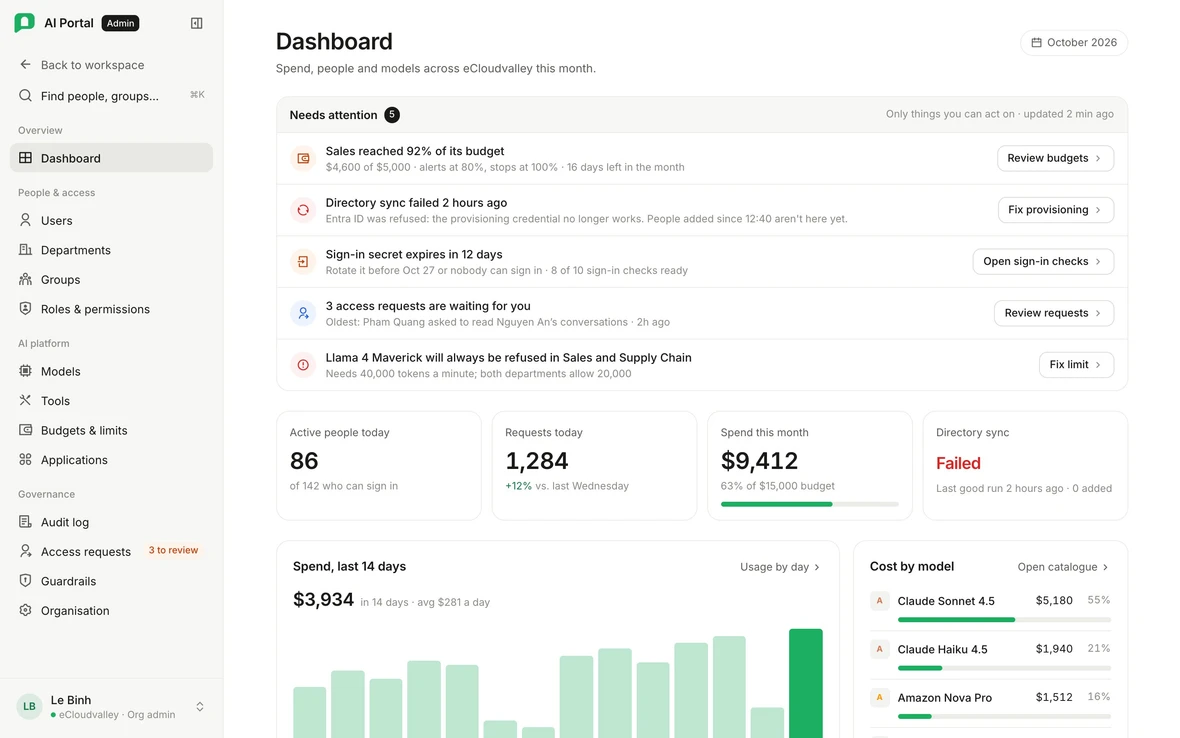
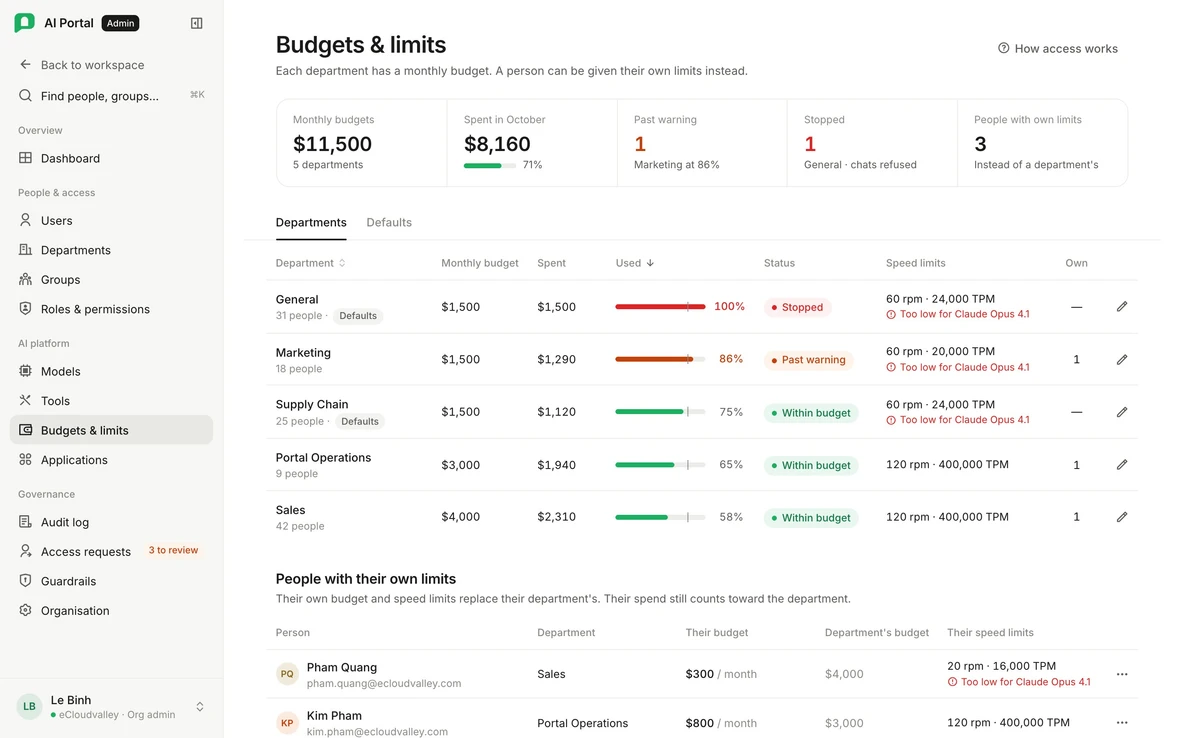
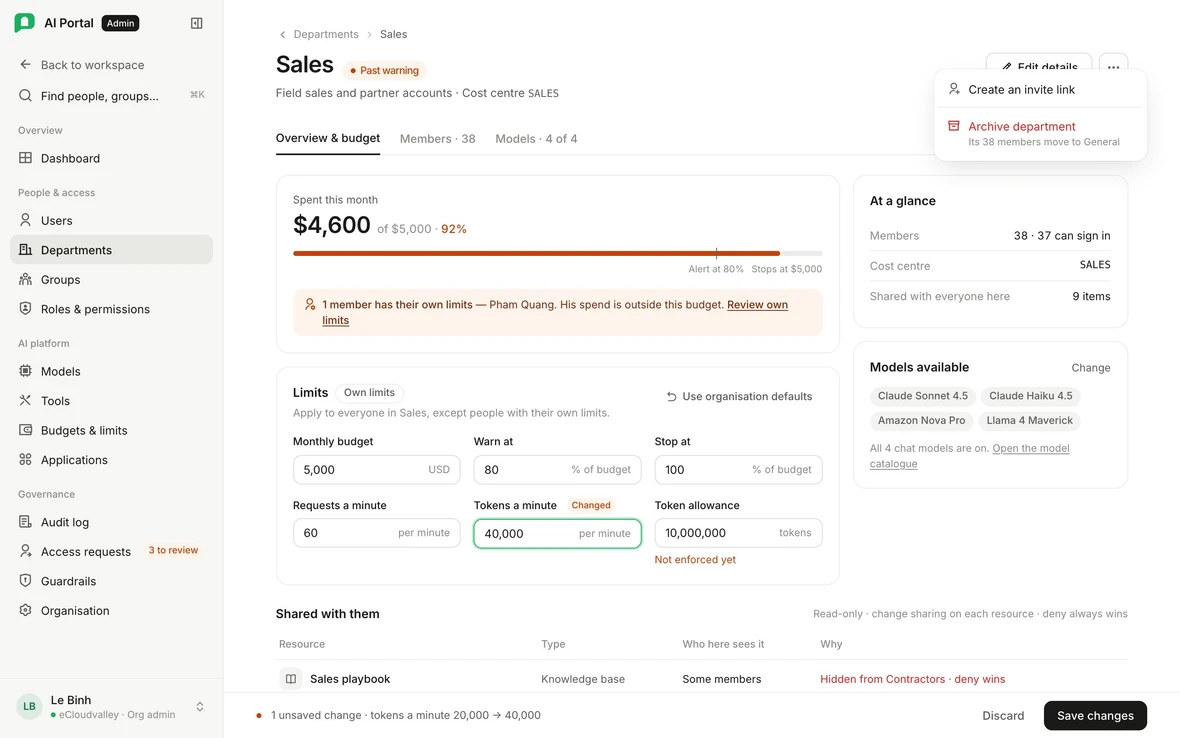
Each department gets a monthly budget, enforced at the model gateway before the next call.

1
department billed per request
Unassigned people land in General.
80%
soft alert, seeded
Flags the department, refuses nothing.
100%
hard stop at the gateway
Next call refused until reset or raise.
3
policy tiers
Organisation, department, person. Most specific wins.
Every reply

The cost of every reply, per model call.

Each call costed and logged, then grouped by turn.

Budget requests

Ask for more budget. An approver decides.

Approved as written. Spend still counts to the department.

Models by department

Choose models per department.

Block what a department shouldn't spend on.

Rate limits

Rate limits that clear on their own.

Per-minute caps. The agent pauses briefly and retries.

Usage by person, department, model and day.
Cost Analyst role sees all spend.
Personal limits still bill the department.
Bedrock usage on your own AWS bill.

See budgets and per-reply cost in a live walkthrough.

Audit & guardrails

Accountability for every call.

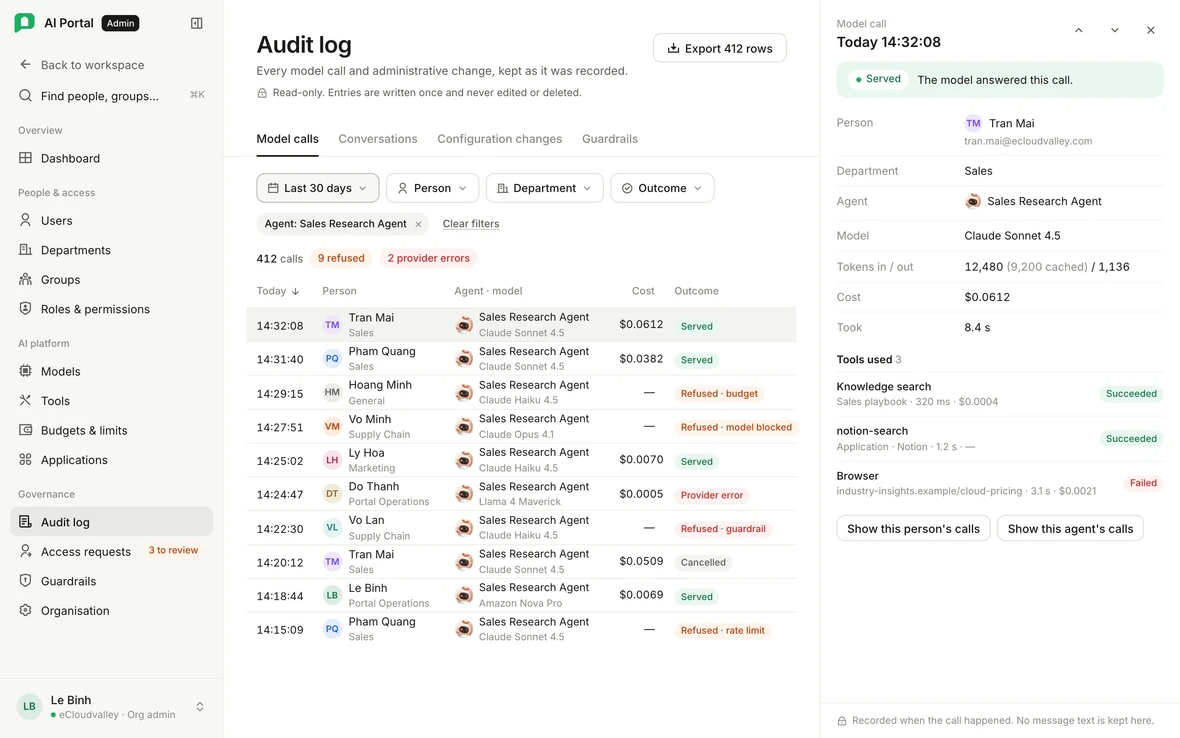
An audit row for every model call. Sensitive data masked before the AI sees it.

An audit row per model call

Who, which department, agent and model, what it cost and when. Written once.

Masked before the AI sees it

Block, mask or flag wherever text enters. Vietnamese IDs built in.

A second admin for transcripts

Reading someone's chats needs another admin's approval, never the requester's. It expires on its own.

Inside your AWS account

It runs in your AWS account. Not someone else's.

Your own deployment, from the same templates. A Bedrock call stays in your account.

1Public entranceCloudFront. All else private.
0Hosts reachable from the internetNo public IP, no open shell.
1Organisation per deploymentYour stack, your data.
Click any part to see what it does.
Your AWS account One organisation Your IAM, network and region
Public edge
Private network
Data hostattached volume
AWS services
  • No public IP
  • No key pair
  • No listening shell
AWS services

Amazon Bedrock

Your IAMStays in your account

Claude, Nova, Llama and more, under your IAM. The call stays in your account.

9 / 15
Security & identity

The answers your security review asks for.

Enforced in Keycloak, the API, the gateway and the agent layer.

Single sign-on through Keycloak

OIDCEntra ID · Okta

SCIM provisioning

joiners · leavers

Custom roles with a ceiling

billing · owner only

Per-resource visibility

deny always wins

An audit row for every model call

plus transcript reads

Guardrails at four checkpoints

fails closed

Approvals for connected apps

ask before each action

User-delegated OAuth

per-person OAuth

Data and secrets in your account

single-tenant

Encryption at rest and backups come from your account's own stack, confirmed per deployment with eCloudvalley.

Who it’s for

For everyone who signs off, and everyone who logs in.

IT, security, finance, department heads and employees. One portal, the right view for each.

Pick a role ←→

For CIO & IT

One AI platform, on the cloud you already run.

  • Replace scattered subscriptionsOne portal for every team, on Amazon Bedrock.
  • One admin consolePeople, models, apps, budgets and audit in one place.
  • Joiners and leavers, handledSCIM from Entra ID or Okta.
See the admin console in a demo
Delivered by ECV

From a fresh AWS account to company-wide AI.

eCloudvalley, an AWS Premier Tier Services Partner, deploys it into your account from the same templates for every customer.

Talk to ECV

No custom code per customer

  1. 01

    Discover

    Region, identity provider, models, departments and an infrastructure estimate.

  2. 02

    Deploy into your AWS account

    From your own infrastructure repository.

  3. 03

    Connect identity & SharePoint

    A guided wizard connects sign-in, models and documents.

  4. 04

    Pilot one department

    One team's budget, models, guardrails and agents, with real usage.

  5. 05

    Roll out

    Add departments as you go. Nothing to install.

About eCloudvalley

Born in the cloud in 2013, eCloudvalley is an AWS Premier Tier Services Partner delivering end-to-end cloud services across Asia Pacific.

  • 800+employees
  • 14countries
  • 5,000+customers
  • AWS Partner badge: Migration and Modernization Services 150+ successful migrations
  • AWS Partner badge: Data & Analytics Services Competency 200+ successful implementations
  • AWS Partner badge: Managed Service Provider 100+ active managed services customers

  • AWS Partner badge: Generative AI Services Competency AWS AI Competency Agentic AI Consulting
Your own infrastructure repoEvery change reviewable.
Break-glass access onlyYour admins work in one console.
Admin enablementBudgets, models, guardrails and agents, walked through.

Ready to plan your rollout?

Book a demo
Data & security02

In your own AWS account: database, files and audit, with model calls going to Amazon Bedrock in the region you choose. Optional keys for other providers send those calls to that provider, only after admin approval.

Not freely. It takes a time-boxed grant approved by a different person, and every read is logged.

Models & cost02

Any Amazon Bedrock model your account can reach, through one gateway. Admins choose which models each department may use.

You pay AWS directly for infrastructure and Bedrock usage, and every department has a budget with a hard stop. ECV gives you an infrastructure estimate and a quote up front.

Deployment & support02

It is designed to go from a fresh AWS account to a running portal in a day. A guided wizard then connects sign-in, models and SharePoint.

Yes, for content: chat, scanned documents, search and guardrails all handle Vietnamese. The interface is in English today.

Book a demo

See it running in your own AWS account.

An eCloudvalley specialist shows it with your sign-in, models and budgets, then plans the deployment with you.

Book a demo

We’ll tailor the walkthrough to your team.

Request received

Thanks. An eCloudvalley specialist will email you to set up your demo.